
Instagram continues to evolve as a global content platform, and one of its most impactful recent updates is the Translate Reel feature. This option allows creators to automatically translate reel audio and captions into multiple languages, making content accessible to viewers across different regions and languages.
For creators who publish in regional or local languages, this feature removes language barriers and opens the door to a truly international audience.
This article explains what the Instagram Translate Reel feature is, how it works, who can use it, and how to enable it step by step.
What Is the Instagram Translate Reel Feature?
The Instagram Translate Reel feature automatically converts your reel’s spoken audio and captions into other supported languages. Viewers see or hear the translation based on their language preferences, without the creator needing to upload separate versions of the same reel.
In simple terms, one reel can now speak many languages.
This feature is especially powerful for:
- Educational creators
- Regional language creators
- Tech, finance, and knowledge-based content
- Brands targeting international audiences
Why This Feature Matters for Global Growth
Before this update, language was one of the biggest limitations for reel reach. Even high-quality content struggled to perform outside its native language audience.
With Translate Reel enabled:
- Your content becomes understandable worldwide
- Watch time improves due to better comprehension
- Engagement increases from new regions
- Instagram’s algorithm can push your reel to more markets
This is not just a translation tool it is a growth accelerator.
Who Can Use the Translate Reel Feature?
Currently, the feature is rolling out gradually. You may see it if:
- Your Instagram app is updated
- Your reel includes clear spoken audio
- Your account is eligible for voice translation
Not all accounts will see it immediately, but availability is expanding.
How to Enable Instagram Translate Reel (Step-by-Step)
Follow these steps while uploading or editing a reel:
Step 1: Upload Your Reel
Create or upload a reel as usual with clear voice audio.
Step 2: Open “More Options”
Before publishing, tap on More options on the reel settings screen.
Step 3: Go to Accessibility and Translation
Scroll down to the Accessibility and translation section.
Step 4: Enable Translate Reel
Turn ON the Translate reel toggle.
Step 5: Enable Closed Captions (Recommended)
Switch ON Enable closed captions so Instagram can generate captions automatically.
Step 6: Turn On Translate Closed Captions
Enable Translate closed captions to allow caption translation for viewers.
Step 7: Translation Settings (If Available)
If you see Translation settings:
- Select languages you want to translate into
- Enable Approve translations to preview before publishing
- Optional: Turn on lip-sync for better voice alignment
Step 8: Publish the Reel
- Once enabled, publish your reel normally.
- Instagram will process translations in the background.
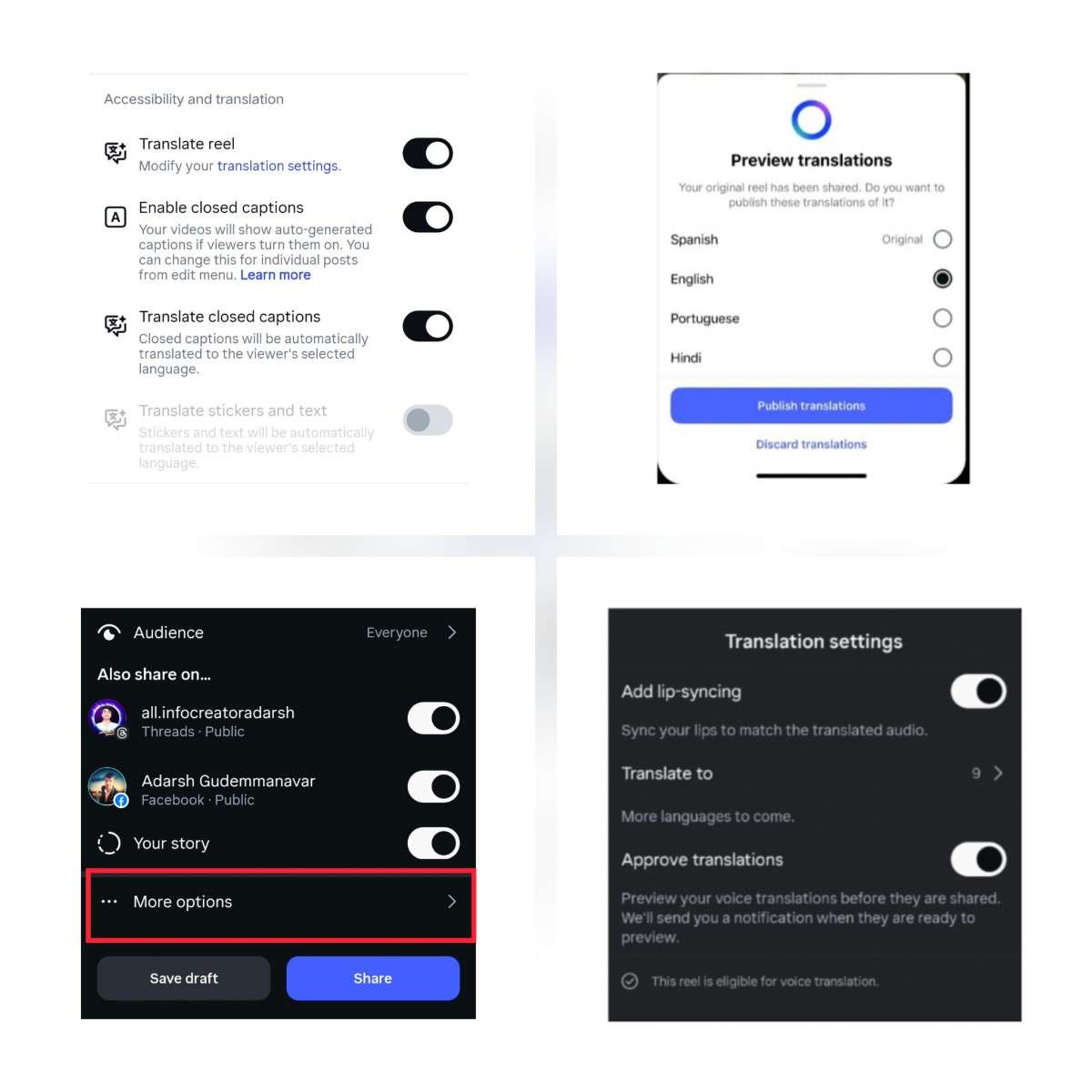
Preview and Approve Translations
After publishing, Instagram may notify you to preview translations.
You can:
- Review translated audio and captions
- Approve or discard specific languages
- Ensure meaning accuracy before wide distribution
This keeps creator control intact.
Best Practices for Better Translation Results
To get the best output from Translate Reel:
- Speak clearly and at a moderate pace
- Avoid heavy background noise
- Use simple, direct sentences
- Enable captions for higher accuracy
Clear audio leads to better translations.
Does Translate Reel Affect Original Content?
No: Your original reel remains unchanged. Viewers who prefer the original language will continue to see it as is. Translations appear only when needed, based on viewer settings.
Conclusion:
The Instagram Translate Reel feature marks a major shift toward borderless content creation. It empowers creators to focus on quality and ideas rather than language limitations.
If you are serious about growing beyond a single region, enabling this feature is no longer optional it is essential.One reel. Multiple languages. Global reach.
FAQ – Instagram Translate Reel Feature
1. What is the Instagram Translate Reel feature?
The Instagram Translate Reel feature allows creators to automatically translate reel audio and captions into multiple languages, helping content reach viewers from different countries without creating separate reels.
2. Who can use the Translate Reel option on Instagram?
This feature is available to eligible Instagram accounts that upload reels with clear spoken audio. Availability depends on app updates and gradual rollout by Instagram.
3. How do I enable Translate Reel on Instagram?
While uploading a reel, go to More options, scroll to Accessibility and translation, and turn on Translate reel. You can also enable closed captions and translated captions for better reach.
4. Does Instagram Translate Reel change my original audio?
No. Your original reel audio remains unchanged. Translations are shown only to viewers who prefer another language.
5. Can I preview translations before they are published?
Yes. If the preview option is available, Instagram allows you to review and approve translations before they are shown to viewers.
6. Is the Translate Reel feature useful for regional language creators?
Yes. This feature is especially beneficial for creators who publish content in regional languages, as it helps them reach a global audience without language barriers.
7. Does enabling Translate Reel help increase reel reach?
Enabling Translate Reel can improve reach and engagement by making your content understandable to international viewers, which can positively impact watch time and visibility.
8. Is the Instagram Translate Reel feature free?
Yes. The Translate Reel feature is provided by Instagram at no additional cost and can be enabled directly from reel settings.
About The Author