Recently, Google has started rolling out a major new Gmail feature that many users have long asked for the ability to change your existing @gmail.com address without losing any of your emails, files, photos, or Google account data. This is a big shift from Google’s previous rules, where Gmail addresses were permanent once created.
What Is This Feature?
Traditionally, if you wanted a new Gmail address for example, because your current one is old, unprofessional, or embarrassing you had to:
- Create a completely new Google account, and
- Manually transfer all your emails, contacts, Drive files, and other data to it.
That process was time-consuming and often confusing. With the new feature, Google is now letting some users edit their existing Gmail username (@gmail.com) while keeping the same Google Account and keeping all their data intact. Google’s account help page You Should Know

How This New Feature Works (Step-by-Step)
Explanation:
1.Eligibility & Rollout
The feature is being rolled out gradually, so not all Gmail users see it yet. Early reports show it first appearing in regions like India and on Google’s support pages in Hindi, but Google intends to expand availability over time.
2.Accessing the Option
When available, you can go to:
- Your Google Account,
- Tap “Personal Info,”
- Then find the “Email” section — where the option to change your Gmail address will appear.
3.Choose a New Address
If eligible, you can select a new @gmail.com username that is available — like changing oldname123@gmail.com to yourname@gmail.com.
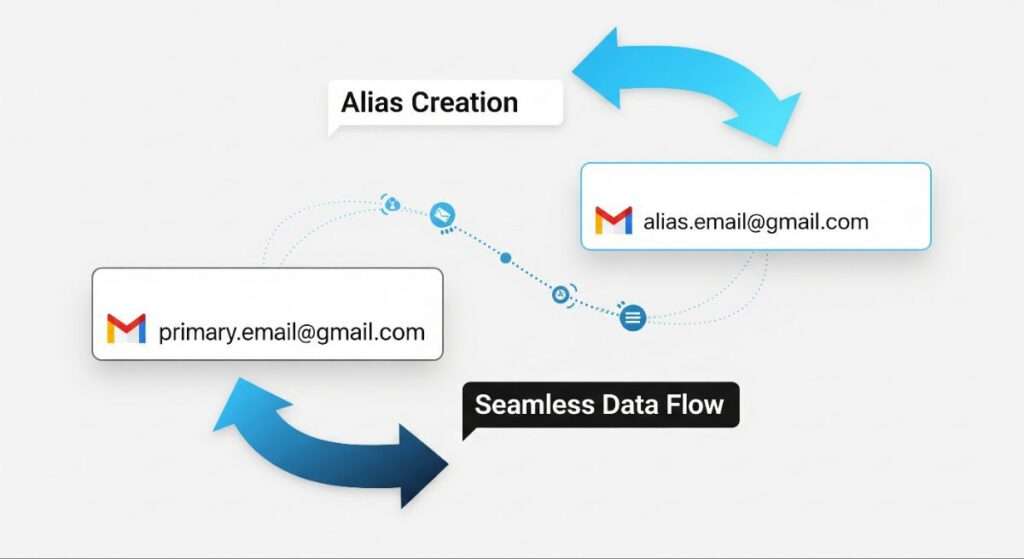
4.Old Address Becomes an Alias ⇒After the change:
- Your old Gmail address becomes a working alias, meaning emails sent to that address will still appear in the same inbox.
- You can sign in to Google services (Gmail, Drive, YouTube, Maps, etc.) with either your old or new address.
5.No Data Lost All your:
- Emails,
- Contacts,
- Google Drive files,
- Photos,
- Calendar entries,
- Subscriptions,
- Account history, remain exactly where they are. Nothing is deleted or moved.
Important Limits & Rules
To make sure the feature is used safely and responsibly, Google has included some limitations:
- You can only change your Gmail address once every 12 months.
- Each account can only make up to three changes total (i.e., up to four different addresses over a lifetime).
- After changing, you cannot delete the new address or create another new Gmail address for 12 months.
These limits help prevent spam, phishing, account confusion, and security problems.
Why This Matters
This feature is significant for several reasons:
1.Frees Users From Old Email Identity
Many people have Gmail addresses created years ago with outdated or unprofessional names. This change lets users modernize their digital identity without starting a new account.
2.Keeps All Data in One Place
Instead of juggling two accounts or losing years of content, everything stays in the same Google Account.
3.Works Across Google Services
You can use both the new and old addresses to sign in to Gmail, YouTube, Google Drive, Maps, and more.
How It Helps Everyday Users
- Professionals can switch to a more formal address
- Students who chose silly names can update their identity
- People changing their legal names (e.g., after marriage) can match their email
- Brand accounts can have consistent identity without losing history
All of this results in less confusion, better branding, and smoother digital identity management.
Summary (Quick Recap)
- You can now change your Gmail address without losing your data.
- Old addresses remain functional and continue to receive emails.
- You can sign in using either email after the change.
- The feature is rolling out gradually and may not be available everywhere yet.
- There are limits on how often you can change the address.
Conclusion:Google’s new Gmail address change feature marks a major shift in how users manage their digital identity. While the option is still rolling out gradually and not yet available to everyone, it clearly reflects .
Google’s focus on user convenience, data safety, and long-term account flexibility. Once fully released, this update will eliminate the need for creating multiple Gmail accounts just to correct or upgrade an email identity making Gmail more user-centric than ever.
FAQ About Google Gmail Update 2025 :
1.Is Google really allowing users to change their Gmail address now?
Google has started rolling out the feature, but it is not yet available to all users globally. Only some accounts can currently see this option as part of a phased rollout.
2.Will I lose my emails or Google Drive data if I change my Gmail address?
No. When this feature is available to your account, all existing emails, Drive files, photos, contacts, and subscriptions remain intact. The Gmail address change does not affect stored data.
3.What happens to my old Gmail address after the change?
Your old Gmail address continues to work as an email alias. Emails sent to the old address will still arrive in the same inbox linked to your Google Account.
4.Can I sign in using both old and new Gmail addresses?
Yes. After changing the address, users can sign in using either the old or new Gmail address, as both remain linked to the same Google account.
5.How often can I change my Gmail address?
Google has set limits:
- You can change your Gmail address once every 12 months
- A maximum of three changes per account is allowed over time
- These limits help prevent misuse and protect account security.
6.Is this feature available for all Gmail users in India?
Not yet. Even in India, availability depends on the account. Google is enabling the feature gradually, so some users may see it while others do not.
7.Can Google Workspace or business email users use this feature?
Currently, the feature appears to be focused on personal @gmail.com accounts. Google Workspace or custom-domain email users must continue using admin-level email management tools.
8.Why did Google introduce this Gmail update now?
Many users created Gmail IDs years ago with outdated or unprofessional names. This update allows users to modernize their digital identity without creating a new account or losing data.
9.How can I check if my account has this option?
Go to your Google Account →Personal Info→Email section. If the feature is enabled for your account, you will see an option to change your Gmail address.
10.What should I do if the option is not visible yet?
There is nothing wrong with your account. Google is releasing the feature in phases. Users need to wait for the rollout to reach their account.
11.Is this change permanent once applied?
Yes. After changing your Gmail address, it cannot be reversed immediately. Google enforces waiting periods to maintain account stability and security.
Content Originality & Image Rights : This article is original, research-based content created for informational purposes. Images used are AI-generated, self-created, or legally permitted for use and do not violate copyright laws. This content complies with the Copyright Act, 1957 and the Information Technology Act, 2000 (India). All trademarks and brand names belong to their respective owners.
About The Author